The three ASP.NET programming models: Web Forms, MVC and Web Pages
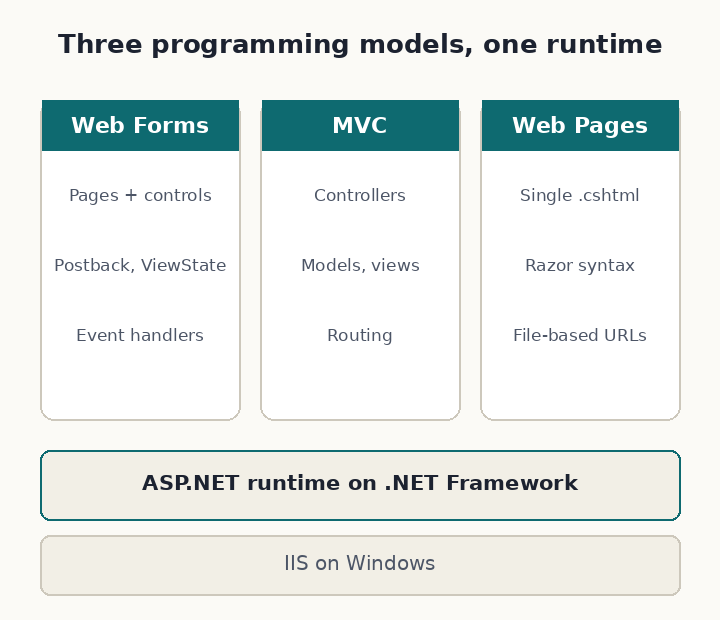
Classic ASP.NET on .NET Framework offered three ways to build a web application: Web Forms, MVC and Web Pages. They share the same runtime, configuration and hosting on IIS, but they organise code very differently. Knowing which model a project uses tells you where to look for things and what kind of changes are easy.
Web Forms
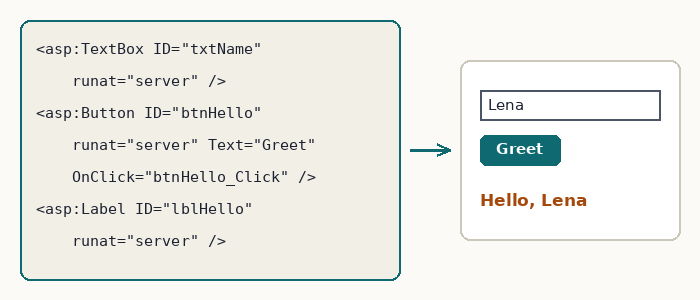
Web Forms, the original model released in 2002, imitates desktop development. A page is an .aspx file containing server controls, with a code-behind class that handles their events:
<asp:TextBox ID="txtName" runat="server" />
<asp:Button ID="btnHello" runat="server" Text="Greet" OnClick="btnHello_Click" />
<asp:Label ID="lblHello" runat="server" />
protected void btnHello_Click(object sender, EventArgs e)
{
lblHello.Text = "Hello, " + Server.HtmlEncode(txtName.Text);
}
Behind this simplicity sit the postback (the page posts to itself), view state (a hidden field that remembers control values) and the page life cycle (Init, Load, control events, PreRender, Render). Server controls generate the HTML and JavaScript for you, and a rich ecosystem of grids, calendars and charts grew around them.
Strengths: very fast development of data-entry screens, drag-and-drop designers, event-driven code familiar to desktop developers. Weaknesses: limited control over generated HTML (much improved in .NET 4 with ClientIDMode and list rendering), large view state on complex pages, and code that is hard to unit-test because logic tends to sit in event handlers.
MVC
ASP.NET MVC (first released in 2009) separates the application into models, views and controllers. A URL is routed to a controller action, which prepares a model and chooses a view to render it:
public class GreetingController : Controller
{
    [HttpGet]
    public ActionResult Index() => View(new GreetingModel());

    [HttpPost]
    [ValidateAntiForgeryToken]
    public ActionResult Index(GreetingModel model)
    {
        if (ModelState.IsValid)
            model.Message = "Hello, " + model.Name;
        return View(model);
    }
}

public class GreetingModel
{
    [Required] public string Name { get; set; }
    public string Message { get; set; }
}
@model GreetingModel
@using (Html.BeginForm())
{
@Html.AntiForgeryToken()
@Html.LabelFor(m => m.Name) @Html.TextBoxFor(m => m.Name)
<button type="submit">Greet</button>
}
<p>@Model.Message</p>Razor encodes @Model.Message automatically. There is no view state and no postback life cycle: each request is handled by an action, and you write the HTML yourself.
Strengths: full control over markup and URLs, testable controllers, clear separation of concerns, natural fit for JavaScript-heavy front ends. Weaknesses: more code for simple forms, and a learning curve for developers used to controls and events. Handling several buttons in one form is shown in Multiple submit buttons in one MVC form.
Web Pages
ASP.NET Web Pages (2010), introduced with the WebMatrix tool, aimed at small sites and beginners. Each .cshtml file is a page that mixes Razor markup and code, with routing based on file names:
@{
    var name = Request.Form["name"];
    var message = IsPost && !name.IsEmpty() ? "Hello, " + name : "";
}
<form method="post">
    <input name="name" value="@name" />
    <button type="submit">Greet</button>
</form>
<p>@message</p>
Its single-file approach resembles PHP or classic ASP, with Razor's automatic encoding. Web Pages had a small footprint in enterprise projects and WebMatrix was discontinued; its idea lives on in ASP.NET Core Razor Pages.
Comparison
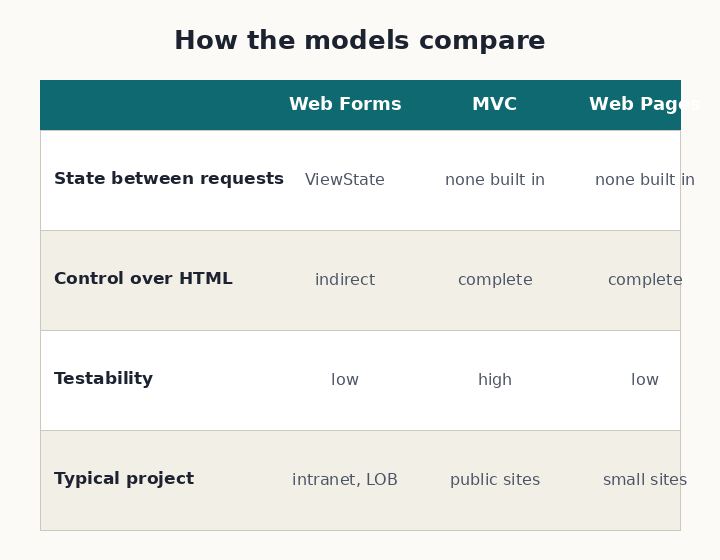
| Web Forms | MVC | Web Pages | |
|---|---|---|---|
| Unit of code | Page + code-behind | Controller action + view | Single .cshtml page |
| State between requests | View state, postbacks | None built in; model binding | None built in |
| Control of HTML | Indirect, through controls | Complete | Complete |
| Testability | Low without extra patterns | High | Low |
| Typical use | Line-of-business and intranet apps | Public sites, APIs, larger teams | Small sites |
The models can coexist in one application: an MVC area can be added to a Web Forms project, and many teams migrated that way, page by page.
Where they stand today
All three run only on .NET Framework, whose last version, 4.8.1, is supported as a component of Windows and still receives security fixes. Microsoft does not add features to Web Forms, MVC 5 or Web Pages any more. New development happens in ASP.NET Core, which runs on Windows, Linux and macOS and offers:
- Razor Pages: page-focused, the spiritual successor to Web Pages and the closest model to Web Forms' "one page, one class";
- MVC: the same pattern, re-implemented;
- Blazor: component-based UI with C# event handlers, which many Web Forms developers find familiar;
- Minimal APIs for HTTP services.
Web Forms itself was not ported to ASP.NET Core. Moving an application means rewriting its pages, typically to Razor Pages or Blazor, while reusing business and data-access code compiled for .NET Standard or modern .NET. The website vs web application article covers another choice you will meet in older Web Forms code.
How to tell which model a project uses
- Web Forms:
.aspxfiles with<%@ Page %>directives, code-behind files (.aspx.cs),runat="server"controls, a<form runat="server">on every page. - MVC 5:
Controllers,ModelsandViewsfolders,.cshtmlviews, aRouteConfig.csinApp_Start, references toSystem.Web.Mvc. - Web Pages:
.cshtmlfiles at the site root used directly as pages, no controllers, often an_AppStart.cshtmlfile. - ASP.NET Core: an SDK-style project file (
<Project Sdk="Microsoft.NET.Sdk.Web">) and aProgram.csthat builds the web application; noweb.configis needed except for IIS hosting.
Official documentation
- Microsoft Learn: ASP.NET Web Forms, ASP.NET MVC, ASP.NET Web Pages
- Microsoft Learn: Choose an ASP.NET Core web UI
- Microsoft Learn: Blazor for ASP.NET Web Forms developers
- Microsoft Learn: .NET Framework lifecycle